Businesses across every industry are realizing the critical importance of real-time communication monitoring. Whether it’s for sales, customer support, or performance management, call monitoring has become an essential part of every modern contact center and marketing team. It helps organizations analyze interactions, evaluate agent performance, ensure compliance, and optimize customer experiences.
The market today is filled with intelligent solutions that offer much more than simple call listening — they include AI-driven analytics, live dashboards, sentiment detection, and team coaching tools. In this guide, we’ll explore the 15 Best Call Monitoring Software For 2026 that are transforming how businesses track and improve their phone-based interactions. From small startups to large enterprises, these platforms provide everything you need for smarter, faster, and more efficient communication management.
What Is Call Monitoring Software?
Call monitoring software is a powerful tool that enables businesses to listen, record, analyze, and manage phone conversations in real-time. It helps organizations understand how their teams interact with customers, identify areas for improvement, and maintain quality across every interaction.
Whether it’s a sales representative closing a deal or a customer support agent resolving an issue, every call contains valuable insights. Call monitoring systems capture these interactions and turn them into measurable data to help improve performance, compliance, and customer satisfaction.
Why Is Call Monitoring Important in 2026?
The business world is increasingly data-driven, and phone conversations are no exception. Call monitoring plays a vital role in:
- Quality Assurance – Ensuring that customer calls are handled professionally and efficiently.
- Performance Evaluation – Tracking agent behavior and identifying training opportunities.
- Customer Experience Optimization – Understanding customer pain points and improving overall satisfaction.
- Compliance and Security – Recording and monitoring calls helps companies adhere to industry regulations.
- Productivity Improvement – Real-time insights help managers make faster, data-backed decisions.
In short, call monitoring isn’t just about listening to calls — it’s about learning from them.
How Does Call Monitoring Software Work?
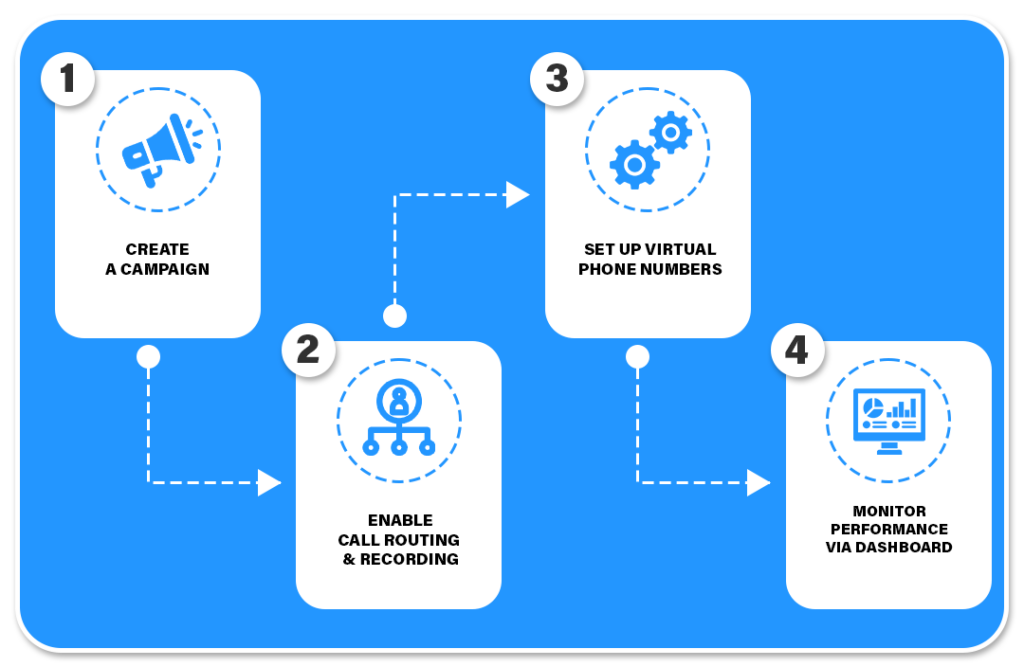
The process of call monitoring is typically simple yet sophisticated. Here’s how it works:
- Call Capture: The software connects with a company’s phone system and records or streams live calls.
- Real-Time Listening: Managers or supervisors can listen to ongoing calls and provide immediate feedback.
- Analytics & Reporting: Advanced systems convert call data into reports that show performance metrics, response times, and conversation quality.
- Integration with CRM: Many tools integrate directly with CRM systems to link calls to customer profiles for a complete view of interactions.
- Data Insights: Some software even uses AI to detect emotions, keyword trends, and conversion opportunities.
Key Features of Modern Call Monitoring Tools
Modern call monitoring software goes far beyond basic call recording. Businesses now look for features that add intelligence and automation to their communication workflow:
- Real-Time Monitoring: Enables supervisors to listen, whisper, or barge into calls for live coaching.
- Detailed Call Analytics: Provides metrics on call duration, response time, missed calls, and more.
- Call Recording & Storage: Keeps call recordings securely stored for review and training.
- Advanced Routing: Routes calls to the right department or agent based on skill or availability.
- Lead Tracking: Helps identify which campaigns or sources are driving valuable calls.
- User Role Management: Allows admins to assign permissions based on roles and responsibilities.
- Integration Support: Works seamlessly with CRM, marketing, and communication tools.
These features make call monitoring software a critical part of every business’s customer communication strategy.
Benefits of Using Call Monitoring Software
Businesses of all sizes are seeing massive benefits from implementing call monitoring tools. Here are some of the top advantages:
- Enhanced Customer Satisfaction: By tracking customer interactions, businesses can respond faster and more accurately to issues.
- Improved Sales Performance: Sales managers can monitor calls and provide targeted feedback to improve closing rates.
- Data-Driven Decisions: Real-time reports give insights into customer behavior and marketing effectiveness.
- Compliance & Transparency: Ensures every call follows company policy and regulatory standards.
- Employee Training: Recorded calls are excellent resources for training new agents and improving communication skills.
Future Trends in Call Monitoring
The call monitoring industry is evolving rapidly with technology advancements like AI and automation. Some of the major trends shaping the future include:
- AI-Powered Insights: Systems can automatically evaluate call sentiment and highlight performance issues.
- Predictive Analytics: Businesses can anticipate customer needs based on historical call data.
- Speech Recognition: Automatic transcription and keyword tracking help find patterns quickly.
- Omnichannel Monitoring: Integration of voice, chat, and email conversations for a unified view.
- Cloud-Based Flexibility: Cloud solutions make call monitoring accessible from anywhere.
Comparison Summary: Top 15 Call Monitoring Software For 2026
| Rank | Software Name | Key Strength | Ideal For | Real-Time Monitoring | AI/Analytics |
|---|---|---|---|---|---|
| 1 | Atlas | Real-time monitoring, routing, attribution | Agencies & marketers | Yes | Yes |
| 2 | CallRail | Conversation intelligence & tracking | SMBs & agencies | Yes | Yes |
| 3 | Invoca | AI intent & outcome analytics | Enterprises | Yes | Advanced |
| 4 | CallTrackingMetrics | Attribution + live monitoring | Marketers & call centers | Yes | Yes |
| 5 | RingCentral | Enterprise UC + live coaching | Large teams | Yes | Yes |
| 6 | Aircall | Lightweight live supervision | Startups | Yes | Basic |
| 7 | Freshdesk Contact Center | Affordable and simple | Small teams | Yes | Limited |
| 8 | CloudTalk | Remote-friendly call analytics | Sales teams | Yes | Yes |
| 9 | 8×8 Contact Center | Speech analytics + compliance | Enterprises | Yes | Advanced |
| 10 | Five9 | AI-powered call center tools | Large BPOs | Yes | Advanced |
| 11 | Nextiva | Unified communication platform | Mid-sized teams | Yes | Yes |
| 12 | Talkdesk | Intelligent AI monitoring | Large enterprises | Yes | Advanced |
| 13 | Zendesk Talk | Integrated with helpdesk | Support teams | Yes | Limited |
| 14 | Dialpad | AI-driven live transcription | Sales & support | Yes | Advanced |
| 15 | Vonage | Reliable UC system | Enterprises | Yes | Yes |
Here is the detailed description about the 15 Best Call Monitoring Software in 2026
1) Atlas — Best Call Monitoring Software
What it is: Atlas (CallAtlas / ATLAS) is an inbound call-tracking and analytics platform built for advertisers, agencies and pay-per-call networks. It emphasizes real-time dashboards, live call monitoring, routing and campaign-level attribution.
Key features
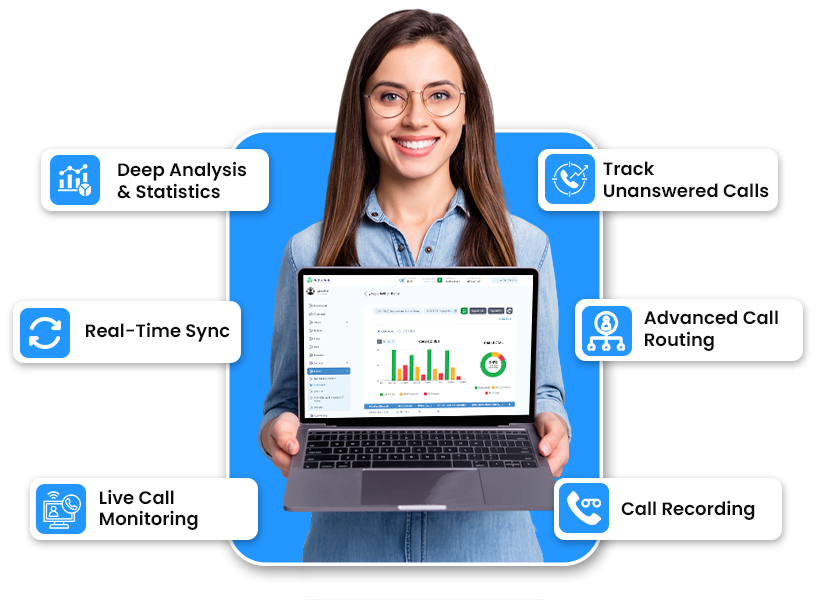
- Real-time call monitoring & dashboards — live sync of incoming calls, agent activity, and campaign KPIs so supervisors and marketers see performance as it happens.
- Number management & unique number insertion for campaign-level attribution.
- Call scoring & tagging / activity log — lets teams classify calls (lead, spam, sale) and keep an audit trail for quality and billing.
- Smart call routing & workflow automation — route calls to specific reps or queues based on rules, time, or campaign.
Why Choose Atlas in 2026
- Built around pay-per-call and agency workflows, Atlas is designed for marketers who need both precise attribution (keyword / campaign → phone lead) and live operational controls (monitor, intervene, route). The dashboard+real-time features make it a strong fit where minutes matter.
Ideal for
- Ad agencies running PPC + call campaigns, pay-per-call networks, and businesses with high-value phone conversions (legal, healthcare, home services).
Integrations
- CRM integrations, web analytics and advertising platforms (typical for call tracking platforms — Atlas advertises CRM and analytics integrations).
Pricing (what to expect)
- Pricing models for platforms like Atlas usually combine a monthly platform fee + per-number or per-call charges. Exact tiers require a demo/quote (Atlas encourages booking a demo).
Pros
- Real-time visibility and routing built for advertising workflows. Good for billing/PPCall reconciliation.
Cons - Smaller/younger platforms sometimes require support onboarding for complex integrations.
Example use case
- A performance agency launches 10 Google campaigns and assigns unique dynamic numbers. Atlas routes high-intent calls to a specialist queue and flags calls under 30s as “screened/low value” for QA and billing.

2) CallRail — Conversation intelligence + easy call monitoring
What it is: CallRail is a broadly used call-tracking, conversation intelligence and lead-management platform popular with small/medium businesses and agencies. It combines call tracking, form tracking and AI-driven conversation insights.
Key features
- Conversation Intelligence — automated summaries, transcription and keyword detection to surface important calls without manual listening.
- Live listening & call monitoring tools — supervisors can monitor ongoing calls and use real-time KPIs for coaching.
- Lead Center — unified view for phone and web leads so sales teams can follow up quickly.
Why CallRail in 2026
- CallRail focuses on usability and a marketer-first product: quick setup, strong integrations (CRMs, Google Ads), and AI features that save review time. That balance makes it a favorite for teams that need monitoring + marketing attribution without heavy customization.
Ideal for
- SMBs, local businesses, digital marketing agencies, and teams that rely on both web and phone leads.
Integrations
- Deep integrations with Google Ads, popular CRMs (HubSpot, Salesforce), analytics tools, and many ad platforms.
Pricing (what to expect)
- CallRail publishes tiered plans (usually monthly) with add-ons for conversation intelligence and additional numbers/usage; they also offer trials. Exact pricing changes often so check their site for current tiers.
Pros
- Easy onboarding and strong marketer features (dynamic insertion, form+call tracking).
Cons - At very large scale / complex call-flow needs, enterprises sometimes need more bespoke routing or integration work.
Example use case
- A local home-services company uses CallRail to see which ads drive phone leads, listens to flagged “sale” calls for coaching, and routes hot leads to the best closer via live monitoring.
3) Invoca — Enterprise conversation intelligence & call monitoring
What it is: Invoca is an enterprise-grade conversation intelligence and call tracking platform that focuses on AI-driven intent analysis, attribution and optimization for high-value marketing programs. (Invoca acquired DialogTech and has positioned itself as a leader for large advertisers.)
Key features
- AI intent & outcome scoring — automatically measures caller intent and conversion outcomes to prioritize calls that drove revenue.
- Advanced conversation analytics — deep analytics for campaign optimization and media spend decisions.
- Enterprise routing & integrations — built for complex ad stacks and CRMs with secure enterprise controls.
Why Invoca in 2026
- For enterprises that need not just monitoring but automated intent detection and ROI attribution at scale, Invoca’s AI and large-account focus make it a top choice. The DialogTech acquisition broadened its capabilities for marketers.
Ideal for
- Large enterprises, national advertisers, verticals with high lifetime value per phone lead (insurance, financial services, travel).
Integrations
- Extensive: ad platforms, enterprise CRMs, marketing clouds and call center systems. Designed to plug into complex martech stacks. Invoca
Pricing (what to expect)
- Enterprise pricing — custom quotes based on call volume, features (AI scoring, integrations), and SLAs. Expect a higher entry point than SMB solutions.
Pros
- Powerful AI for intent and outcomes, enterprise security/compliance.
Cons - Cost and complexity — overkill for small teams or simple monitoring needs.
Example use case
- A national insurance brand uses Invoca to automatically detect calls that indicate policy intent, feed the signal into the ad platform to adjust bids, and let supervisors monitor flagged calls in real time.
4) CallTrackingMetrics — Unified call monitoring and analytics
What it is:
CallTrackingMetrics is an all-in-one call tracking, contact center, and performance analytics platform that helps businesses monitor calls, measure ad performance, and improve customer conversations. It combines marketing attribution with customer communication tools in one interface.
Key features:
- Smart Call Routing: Automatically route incoming calls to the right agents or departments based on caller intent, location, or campaign source.
- Real-Time Call Monitoring: Supervisors can listen, whisper, or barge into live calls to improve customer interactions instantly.
- Marketing Attribution Reports: Tracks which ad, keyword, or campaign generated each call.
- Call Recording & Transcription: Allows detailed analysis and quality assurance.
Why CallTrackingMetrics in 2026:
It bridges the gap between marketing data and contact center performance, making it perfect for companies that want to monitor live calls and track ROI within the same dashboard.
Ideal for:
Digital marketers, agencies, and call centers that want both call monitoring and conversion tracking.
Integrations:
Google Ads, HubSpot, Salesforce, Zoho, and Slack.
Pros:
- Flexible automation and triggers.
- Easy-to-use dashboard for marketing teams.
Cons: - Requires setup for advanced routing features.
Example use case:
A marketing agency uses CallTrackingMetrics to monitor call quality, analyze campaign performance, and improve agent coaching based on live monitoring and recordings.
5) RingCentral — Cloud-based call monitoring for teams
What it is:
RingCentral is a cloud communication and collaboration platform that includes strong call monitoring and management tools. It is widely used by remote teams, enterprises, and customer support departments for unified voice, video, and messaging.
Key features:
- Live Call Monitoring: Supervisors can listen to live calls, whisper advice to agents, or take over a conversation.
- Quality Assurance Dashboards: Detailed analytics on call duration, agent performance, and missed calls.
- AI-Powered Insights: Sentiment analysis and keyword tracking for understanding customer tone.
- Call Recording & Audit Trails: Maintain records for compliance and training.
Why RingCentral in 2026:
As hybrid work continues to grow, RingCentral’s centralized cloud platform makes call monitoring accessible from anywhere. Its AI features also make it ideal for improving customer satisfaction through real-time insights.
Ideal for:
Large teams, customer service departments, and distributed businesses.
Integrations:
Microsoft Teams, Salesforce, Zendesk, and Google Workspace.
Pros:
- Scalable cloud-based platform.
- Reliable uptime and global availability.
Cons: - Slightly expensive for small businesses.
Example use case:
A multinational support team uses RingCentral to monitor real-time conversations, identify customer sentiment, and improve coaching through whispering features during live calls.
6) Aircall — Modern phone system with live call supervision
What it is:
Aircall is a cloud-based phone system built for modern sales and support teams. It integrates seamlessly with CRMs and help desks, providing live monitoring and analytics to enhance productivity and customer satisfaction.
Standout features:
- Live Call Monitoring: Managers can listen to live calls and join when necessary.
- Call Whispering & Coaching: Supervisors can guide agents without the caller hearing.
- Analytics Dashboard: Real-time metrics like missed calls, average response time, and agent activity.
- Integration with CRMs: Ensures call data syncs automatically with Salesforce, HubSpot, and similar tools.
Why Aircall in 2026:
Aircall continues to lead in simplicity and real-time supervision features. Its lightweight cloud design makes it ideal for remote teams and startups looking to monitor calls effectively.
Ideal for:
Startups, SaaS companies, and distributed sales teams.
Integrations:
HubSpot, Pipedrive, Zendesk, Intercom, and Shopify.
Pros:
- Easy setup and clean user interface.
- Real-time analytics for agent performance.
Cons: - Limited customization for complex routing.
Example use case:
A SaaS startup uses Aircall to monitor calls from new leads, track response times, and coach sales representatives using whisper mode for faster conversions.
7) Freshdesk Contact Center (formerly Freshcaller) — Smart monitoring for support teams
What it is:
Freshdesk Contact Center is a cloud-based call management system designed for customer support and sales teams. It provides advanced call monitoring, recording, and analytics features integrated directly into the Freshworks ecosystem.
Standout features:
- Live Call Monitoring & Whispering: Managers can listen to live calls, coach agents privately, or take control of critical conversations.
- Call Metrics & Reports: Offers data on call volumes, response times, and agent activity.
- Multi-Level IVR: Helps in routing calls to the right departments.
- Call Recording & Quality Review: Essential for training and maintaining quality standards.
Why Freshdesk Contact Center in 2026:
It’s ideal for companies already using Freshworks products like Freshsales or Freshchat. The platform’s smooth interface and affordability make it a popular choice for growing support teams.
Ideal for:
Customer support teams, small to medium businesses, and startups.
Integrations:
Freshdesk, Freshsales, Slack, and Zapier.
Pros:
- Affordable and beginner-friendly.
- Native integration with other Freshworks tools.
Cons: - Limited customization compared to enterprise systems.
Example use case:
A customer support team uses Freshdesk Contact Center to monitor ongoing calls, whisper advice to agents during complex issues, and evaluate call recordings for quality assurance.
8) CloudTalk — Real-time monitoring for sales and support
What it is:
CloudTalk is a modern VoIP-based call center software built for sales and support teams. It offers robust call tracking, real-time monitoring, and analytics to boost productivity and communication efficiency.
Standout features:
- Live Call Monitoring: Enables managers to listen, whisper, or jump into calls in real time.
- Performance Dashboard: Displays call statistics, missed calls, and agent performance metrics.
- Smart Dialer & Call Queues: Optimizes call handling and reduces wait times.
- Call Recording & Evaluation: Provides full visibility into every interaction.
Why CloudTalk in 2026:
CloudTalk has evolved into one of the most scalable cloud-based solutions for global teams. It’s lightweight, easy to deploy, and perfect for monitoring remote call center activities.
Ideal for:
Sales teams, telemarketing agencies, and customer service centers.
Integrations:
HubSpot, Salesforce, Pipedrive, and Zendesk.
Pros:
- Excellent UI and real-time supervision tools.
- Affordable and scalable for growing businesses.
Cons: - Limited advanced analytics in lower-tier plans.
Example use case:
A global sales team uses CloudTalk to monitor outbound calls, analyze conversion rates, and coach agents in real time using whisper features during calls.
9) 8×8 Contact Center — Enterprise-grade call monitoring & analytics
What it is:
8×8 Contact Center is an enterprise communication platform that provides advanced monitoring, analytics, and AI-driven insights for call centers. It helps businesses improve compliance, coaching, and performance management.
Standout features:
- Live Call Monitoring & Barge-In: Managers can oversee multiple calls simultaneously and join calls when needed.
- Speech Analytics: Identifies trends, customer sentiment, and compliance triggers.
- Custom Reports & Dashboards: Offers in-depth analysis on call performance and customer satisfaction.
- Quality Management Tools: Allows call scoring and feedback sharing for training.
Why 8×8 in 2026
It stands out for its enterprise-level security, scalability, and advanced AI analytics. Companies that require strict compliance and deep reporting benefit most from 8×8’s monitoring system.
Ideal for:
Enterprises, BPOs, and financial service companies that handle sensitive client interactions.
Integrations:
Microsoft Teams, Salesforce, Slack, and Oracle.
Pros:
- Strong AI and analytics suite.
- Reliable for high-volume, regulated industries.
Cons: - Setup complexity for smaller teams.
Example use case:
A financial service provider uses 8×8 to monitor thousands of daily calls for compliance, analyze speech patterns for sentiment, and improve agent scripts using recorded call insights.
10) Five9 — Intelligent cloud contact center with live monitoring
What it is:
Five9 is a leading cloud contact center platform that provides businesses with AI-driven tools, live call monitoring, and automation to enhance customer service performance. It’s widely adopted by enterprise-level organizations for scalability and reliability.
Standout features:
- Supervisor Dashboard: Real-time view of active calls, queue status, and agent performance.
- Listen, Whisper, and Barge Modes: Enables managers to silently monitor, guide agents during calls, or join live conversations when necessary.
- AI-Powered Speech Insights: Analyzes customer sentiment and agent behavior.
- Quality Management: Built-in call recording, tagging, and scoring systems.
Why Five9 in 2026:
With its strong AI integration and real-time monitoring, Five9 helps enterprises optimize call performance and ensure a consistent customer experience. It’s especially suited for high-volume operations and remote agent monitoring.
Ideal for:
Large enterprises, BPOs, and customer service teams that prioritize compliance and AI-driven quality control.
Integrations:
Salesforce, Microsoft Dynamics, ServiceNow, and Zendesk.
Pros:
- Excellent reliability and enterprise-grade features.
- AI analytics improves agent feedback and performance.
Cons: - Costly for smaller teams.
Example use case:
A global retail contact center uses Five9 to monitor hundreds of calls daily, provide live coaching to agents, and identify recurring issues using speech analytics.
11) Nextiva Contact Center — Unified communication with monitoring tools
What it is:
Nextiva is an all-in-one communication and contact center platform that combines voice, video, and chat with real-time call monitoring tools. It helps businesses maintain high-quality communication while tracking agent productivity and customer satisfaction.
Standout features:
- Live Call Supervision: Managers can listen to live conversations, whisper feedback, or barge into ongoing calls.
- Performance Analytics: Detailed reports on response times, missed calls, and call resolution rates.
- Call Recording & Quality Scoring: Helps maintain consistent service levels.
- AI-Powered Speech Insights: Monitors tone and keywords for better customer understanding.
Why Nextiva in 2026:
Nextiva’s cloud-based infrastructure and easy-to-use dashboard make it a go-to platform for growing companies that want enterprise features without heavy setup requirements.
Ideal for:
SMBs, startups, and enterprises transitioning to unified communication solutions.
Integrations:
Salesforce, HubSpot, Zoho CRM, and Microsoft Teams.
Pros:
- User-friendly and quick setup.
- Cost-effective for mid-sized businesses.
Cons: - Some advanced features limited to higher-tier plans.
Example use case:
A tech support team uses Nextiva to monitor live calls, evaluate agent tone, and review recordings for improving customer experience and training.
12) Talkdesk — AI-driven monitoring for modern call centers
What it is:
Talkdesk is a next-generation cloud contact center platform designed to deliver exceptional customer service using automation, AI analytics, and comprehensive call monitoring capabilities.
Standout features:
- Real-Time Monitoring Dashboard: Supervisors can track live call metrics, agent activities, and queue performance.
- AI-Powered Speech Analytics: Detects customer sentiment and intent during live calls.
- Quality Management Suite: Scores and reviews calls for compliance and coaching.
- Workforce Engagement Tools: Offers gamification and performance tracking to motivate agents.
Why Talkdesk in 2026:
With its heavy focus on AI and automation, Talkdesk has become a leader in proactive call quality management. It’s ideal for organizations looking to combine monitoring with intelligent analytics and workforce optimization.
Ideal for:
Large-scale customer support teams, fintech firms, and enterprises with remote or hybrid call agents.
Integrations:
Salesforce, Zendesk, ServiceNow, and Google Cloud.
Pros:
- AI-driven insights improve decision-making.
- Scalable and secure for large organizations.
Cons: - Requires some technical setup for full customization.
Example use case:
A financial institution uses Talkdesk to monitor customer service interactions, detect compliance risks in real time, and train agents using AI-based performance analytics.
13) Zendesk Talk — Simplified call monitoring within customer support
What it is:
Zendesk Talk is a cloud-based voice solution built directly into the Zendesk customer service platform. It allows support teams to handle, monitor, and analyze calls alongside tickets, emails, and chats — making it perfect for omnichannel support operations.
Standout features:
- Live Call Monitoring: Supervisors can listen to active calls and guide agents discreetly.
- Integrated Ticketing: Every call automatically creates a support ticket for tracking and follow-up.
- Call Recording & Transcription: Ideal for training, compliance, and quality control.
- Analytics Dashboard: Offers detailed reports on call volume, response times, and agent performance.
Why Zendesk Talk in 2026:
Zendesk continues to evolve as a leader in customer experience, and its Talk module makes call supervision simple and effective, especially for teams already using Zendesk for ticketing and chat.
Ideal for:
Customer support teams using Zendesk, e-commerce companies, and service-based startups.
Integrations:
Native to Zendesk Suite, with third-party add-ons through the Zendesk Marketplace.
Pros:
- Seamless omnichannel integration.
- Easy for non-technical teams to use.
Cons: - Limited routing and automation compared to standalone call center tools.
Example use case:
An e-commerce helpdesk uses Zendesk Talk to monitor customer calls in real time, link them with support tickets, and analyze conversation quality for future training.
14) Dialpad — AI-powered real-time call supervision
What it is:
Dialpad is an AI-driven business communication and call center software offering intelligent call monitoring, analytics, and live transcription. It uses AI to summarize calls, detect sentiment, and provide live coaching suggestions to agents.
Standout features:
- Real-Time Call Transcription: Instantly converts voice to text during live calls.
- AI Coaching & Alerts: Detects keywords and suggests real-time responses to agents.
- Live Call Monitoring: Supervisors can observe ongoing conversations and barge in when necessary.
- Call Analytics: Comprehensive insights into agent performance, call outcomes, and customer sentiment.
Why Dialpad in 2026:
With the rapid rise of AI in communication, Dialpad remains one of the smartest call monitoring systems. It goes beyond supervision by actively improving conversation quality using AI cues and feedback.
Ideal for:
Sales and support teams, AI-focused companies, and remote organizations.
Integrations:
HubSpot, Salesforce, Slack, Google Workspace, and Microsoft 365.
Pros:
- Excellent AI-driven monitoring and transcription.
- Cloud-based, reliable, and scalable.
Cons: - Some AI features limited to enterprise plans.
Example use case:
A SaaS sales team uses Dialpad to monitor ongoing calls, get real-time AI tips during customer objections, and use call transcripts for training new representatives.
15) Vonage Business Communications — Flexible call monitoring and reporting
What it is:
Vonage Business Communications is a robust unified communications platform offering real-time call monitoring, analytics, and routing for businesses of all sizes. It’s known for reliability, scalability, and integration flexibility.
Standout features:
- Live Call Monitoring: Allows managers to listen, whisper, or join calls instantly.
- Call Recording & Archiving: Records every conversation securely for compliance.
- Custom Reports: Provides visual analytics on agent productivity and call outcomes.
- Mobile Monitoring: Supervisors can monitor calls remotely via the mobile dashboard.
Why Vonage in 2026
Vonage has strengthened its analytics and AI capabilities, making it a dependable option for businesses that need a unified monitoring solution across voice, video, and messaging channels.
Ideal for:
Mid-sized to large enterprises, customer support departments, and remote-first teams.
Integrations:
Salesforce, Microsoft Teams, HubSpot, and Zoho.
Pros:
- Reliable and scalable cloud platform.
- Wide integration ecosystem.
Cons: - Setup complexity for smaller teams.
Example use case:
A healthcare support team uses Vonage to monitor calls across multiple locations, review recordings for compliance, and improve service delivery using performance reports.
Conclusion
Choosing the right call monitoring software can make a major difference in how your business manages customer relationships and measures team efficiency. As seen from this list of Best Call Monitoring Software, each platform brings its own strengths — from Atlas’s real-time supervision and campaign-level attribution to Invoca’s AI intelligence and RingCentral’s enterprise-grade reliability.
In 2026, success in sales, marketing, and support is no longer just about handling calls — it’s about understanding them deeply. Investing in a reliable call monitoring system ensures transparency, boosts productivity, and improves overall customer satisfaction. Whether you’re a growing business or a large organization, adopting one of these advanced tools can give you the visibility and insights you need to make every call count.
Frequently Asked Questions
Call monitoring software allows businesses to listen, record, and analyze phone calls to improve performance, quality assurance, and customer experience.
It helps in tracking agent performance, ensuring compliance, training teams, and understanding customer interactions to boost satisfaction and sales.
Atlas stands out in 2026 for its real-time tracking, campaign-level reporting, and powerful analytics tailored for agencies and call centers.
Yes, most call monitoring software offers affordable plans and easy integrations suitable for startups and small to mid-sized businesses.
AI enhances call monitoring by detecting sentiments, automating reports, spotting key trends, and providing actionable insights for better decision-making.